

So much has been written about categories and tags already that there is a vast knowledge base to draw on, yet they’re still among the most poorly utilised functions on a website. Used excessively and applied indiscriminately as they so often are, they can become unwieldy and end up causing more problems than they solve.
This post intends to solve that with a simple guide that explains what they are and how to use them.
Categories vs tags – what’s the difference?
Categories and tags appear to be very similar at first. In fact, they are in many ways. They are both methods of classifying content to help users and search engines find it easily (also known as a taxonomy).
The crucial difference is not in ‘the what’ but ‘the how’. Categories and tags do different things, which affects how you apply them. To explore these differences, we can use the analogy of a library (this is a well-worn comparison, but it works).
Start by imagining a library, full of books in disordered piles without any form of classification. I would argue that it would be impossible to find what you’re looking for or even to discover anything inspirational among the chaos.
Given the task of organising this, you would likely start by classifying the books into genres, e.g. romance, horror, non-fiction, and so on. This is similar to the way categories work on a WordPress site.
→ Categories are hierarchical, broad-level topics.
Once in their genres, you might further classify the books by type. So in romance, you might have sections for Regency romance, young adult, book-to-film adaptations, and more. This is similar to tags in WordPress.
→ Tags are “descriptors” that pick out details in the content.
Generally, your content should have one or two categories but can have several tags. We’ll come back to this later.
WordPress categories and tags in action
One of the first things I do when I’m tasked with auditing content for a new client is look at its classification. Not just what it looks like on the front end, but how search engines understand the content.
Tidy, well-structured and organised content is crucial for SEO success. It helps engines find and understand your content and the relationships between different pieces of information on the site.
Let’s look at an illustration of a boiler and heating company.
| Categories | Tags |
| Boiler servicing | Landlords, winter maintenance, boiler insurance, combi boiler, Worcester Bosch, bill saving tips |
| Central heating | Thermostatic radiator valves (TRV), boiler insurance, plumbing, commercial heating |
| Greener energy | Gas boiler ban, boiler alternatives, heat pumps, combi boiler, bill saving tips, new boiler |
Categories are hierarchical, so it’s possible to create parent-child relationships. In theory, we could add ‘heat pumps’ as a sub-category of ‘greener energy’ in the example above. But be careful, creating too many categories and sub-categories can lead to confusion if they’re not applied consistently.
This hierarchy is used by Google to determine how important a topic is to your business, so it should reflect your priority areas. Typically, parent categories align with business areas or services, but not always.
You’ll also notice in this example that several of the tags appear in more than one category. This is important because it helps users find related content. So they might land on a piece about greener energy and see a suggestion for an article on boiler servicing because they share the tag ‘bill saving tips’.
Here’s a great example of tagging in action from Hive.
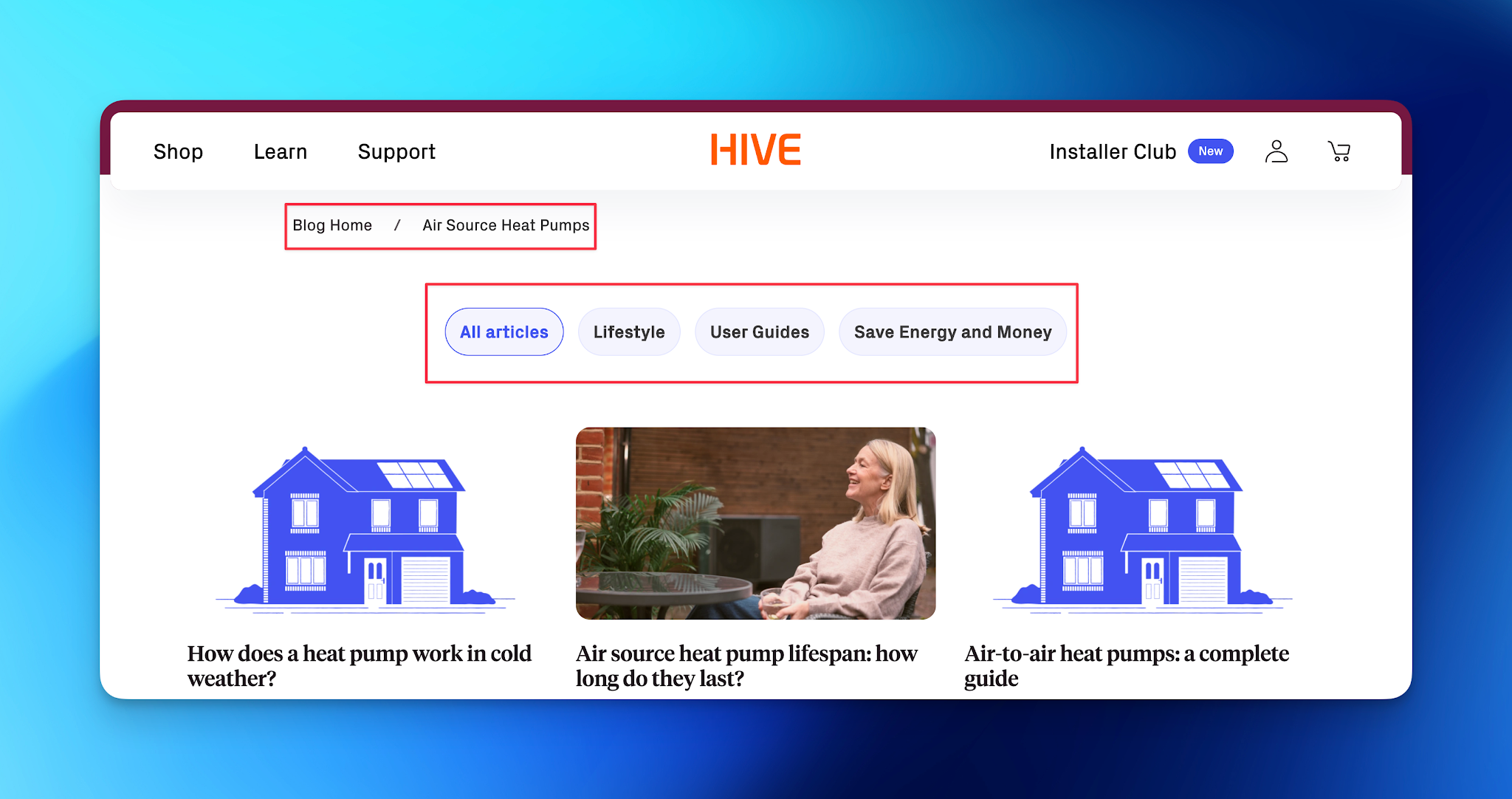
The category is ‘air source heat pumps’, and the tags are ‘lifestyle’, ‘user guides’, and ‘save energy and money’.
Assigning categories and tags – the dos and don’ts
The ultimate goal is to organise your site’s content so it’s tidy. This allows users and search engines to find and understand the information easily.
There’s no one way of doing this; it can only be achieved by mapping out and understanding your content and the relationships that exist between individual pieces. There are, however, some basic dos and don’ts.
Categories and tags – the dos
- Do use categories for broad topics: Start with broad categories that you know will cover several posts. If you’re too specific, you’ll end up with a category per blog post, which is messy.
- Do scale the number of categories: The more categories you create, the harder it is for search engines to understand what you do, so scale your categories according to the size of your site.
- Do use tags for the specifics: Use tags as descriptors so it’s easier for users to find relevant content. They should represent particular themes or topics that fit within a broader category.
- Do make them keyword-rich: We aren’t advocating keyword stuffing here, but you can give search engines a helping hand by using keywords you want to rank for in your category names and tags.
- Do review them regularly: If left unchecked, your categories and tags can spiral out of control. Specifically, you should delete categories that have no assigned posts and merge duplicated categories where appropriate (being careful not to remove anything that already ranks).
If you add categories as you’re writing blog posts, rather than planning your clusters before you start creating content, then you’ll likely end up with a mess. As people add to the list of categories and tags over time, it can spiral out of control.
Categories and tags – the don’ts
- Don’t forget to assign a category: If you write a post and leave it uncategorised, it will appear in an archive for ‘uncategorised’ posts, which looks unprofessional and isn’t good for SEO.
- Don’t use categories and tags interchangeably: Keep categories and tags distinct. Categories should represent broad topics, while tags should focus on specific themes and angles.
- Don’t create a new category for every post: Aim to use existing categories before creating new ones. Each category should have several posts assigned to it, thereby creating clusters of related content, which is really important for SEO.
- Don’t add tags like they’re hashtags: Tags are not hashtags – the goal isn’t to add as many tags as you can think of to ensure you’ve covered every angle of your post. This is likely to overwhelm the user and give Google the impression you’re keyword stuffing.
- Don’t create redundant tags: Avoid using multiple tags that mean the same thing. This can clutter your tag list and dilute the effectiveness of each tag. Instead of creating new tags each time, try to utilise what already exists.
The overall message here is to create your categories and tags with intent; where they are purposeful, they will perform.
Categories and archive pages
When you create a new category, an archive page is added automatically to the site. This page houses all the blog posts assigned to that category.
Take a look at this archive page from the Marketing Labs website. Every post assigned to the PPC category is listed on this archive page.
Just like the other pages on your site, you can add a slug, meta title, and meta description to blog archive pages.
| TOP TIP on blog URLs Compare the difference between these two theoretical blog post URLs: 1. https://marketinglabs.co.uk/ppc/googles-built-in-ai-features-for-ads/ 2. https://marketinglabs.co.uk/googles-built-in-ai-features-for-ads/ One has the category in the URL (highlighted top); the other doesn’t (bottom). If you’re setting up a site from scratch, we advise against including the category in the URL, as it ties you to a category you may want to change later. Of course, this is only possible if you’re creating a new site. We don’t recommend changing your URL structure retrospectively. Once your page has been indexed by Google and started to rank, changing the URL can be detrimental. |
And finally, why use them at all?
Let’s go back to where we started, with the analogy of a library.
All those unordered books would make finding your next good read incredibly difficult, some would say impossible. In the digisphere, categories and tags help make finding new content possible.
The blog post you’re reading now, for example, is categorised under ‘content’ and ‘web design’ (refer to the top of the page 👆).
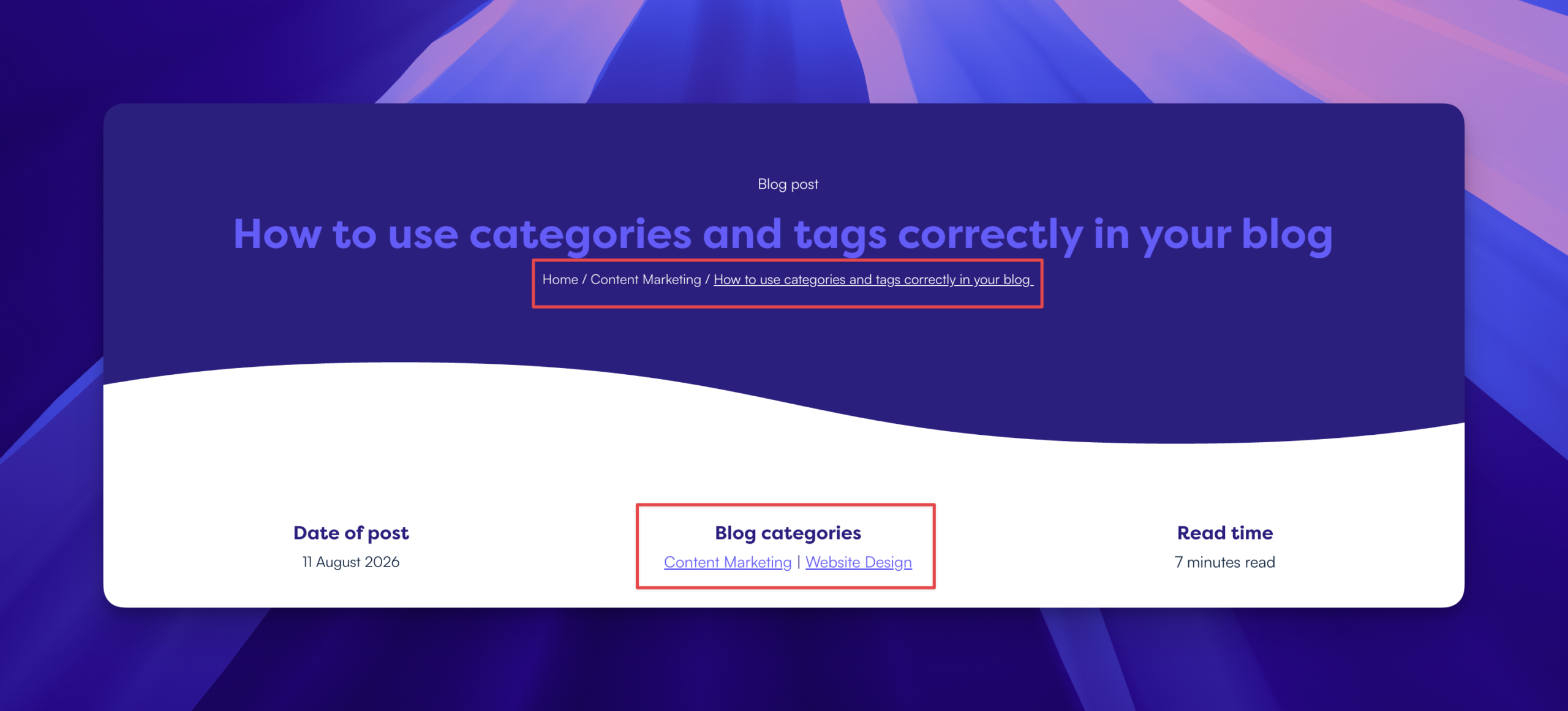
Clicking one of these links will take you to the archive page where you’ll find all the posts on the same subject.
Categorisation creates pathways for users to discover additional related content. This keeps users engaged and encourages them to explore further, in the same way that an organised library encourages its visitors to browse and find new books.
Well-organised content not only benefits users but also helps search engines index and rank pages. When content is well-categorised, search engines can better understand the context and relevance of the material, which can improve visibility in search results.
We’re here to help you create content and optimise it for search so it’s discoverable. Book a discovery call with us for a no-obligation chat.