

Since Google removed FAQ rich results in May 2026, it’s easy for businesses to assume that using FAQs is no longer valuable because it doesn’t support SEO efforts, but that assumption overlooks the bigger picture.
For this blog, we asked our audience on LinkedIn and Instagram about their real-world use of FAQs to see how customers genuinely use them when deciding to purchase a product.
We also dive into recent updates and look at how you can continue to effectively optimise your frequently asked questions for search and AI engines.
Before we get into it, here’s what you should know:
- FAQ rich results have been removed from Google’s search, but that doesn’t mean they are redundant. The structured data still gets parsed by alternative search engines and AI platforms.
- To structure useful FAQs, practice social listening through forums, reviews, and data from your customer service team to see what your audience’s pain points and queries truly are.
- Keep answers direct and use language that is familiar to your community.
- Create a dedicated FAQ webpage and include relevant FAQs on product and service pages.
- Most importantly, use FAQs to support users first and search engines second.
The removal of Google’s FAQ Rich Results
Google has been phasing out FAQ Rich Results since 2023, when it limited their use to “well-known, authoritative government and health websites”.
In May 2026, Google updated its documentation, confirming that it would remove rich results for everyone, which, in the SEO industry, is widely assumed to be due to the misuse of FAQ data for black-hat SEO.
In the early days of SEO, FAQs were used to keyword-stuff in an attempt to manipulate search engine rankings, which Google has been cracking down on.
Although the feature has been removed, the FAQPage structured data type remains valid on Schema.org and is useful for other search engines and AI platforms.
Do FAQs still have SEO value without Rich Results?
The use of the FAQ schema remains relevant for AI platforms and other search engines, which parse it for use in AI overviews and search results on engines such as Bing.
By keeping FAQPage structured data in place, you allow AI platforms to parse the data and use the information in conversational AI chats and overviews, citing your webpage as a reliable source.
FAQs on your website are still an opportunity to appear in People Also Ask results, create internal linking opportunities, increase topical authority, and target long-tail, relevant keywords to improve rankings for those searches, which boosts overall SEO efforts.
Beyond SEO value, ultimately, the primary purpose of FAQs is still customer-centric.
FAQs still support customers on their journey and provide additional information about your brand, products, or policies that may help guide them through the funnel and help them to convert.
If your customers repeatedly ask the same things, those questions belong on your website.
How do customers actually use FAQs?
To understand how customers use FAQs in the real world, Marketing Labs conducted a poll to ask our audience about their experience using FAQs.
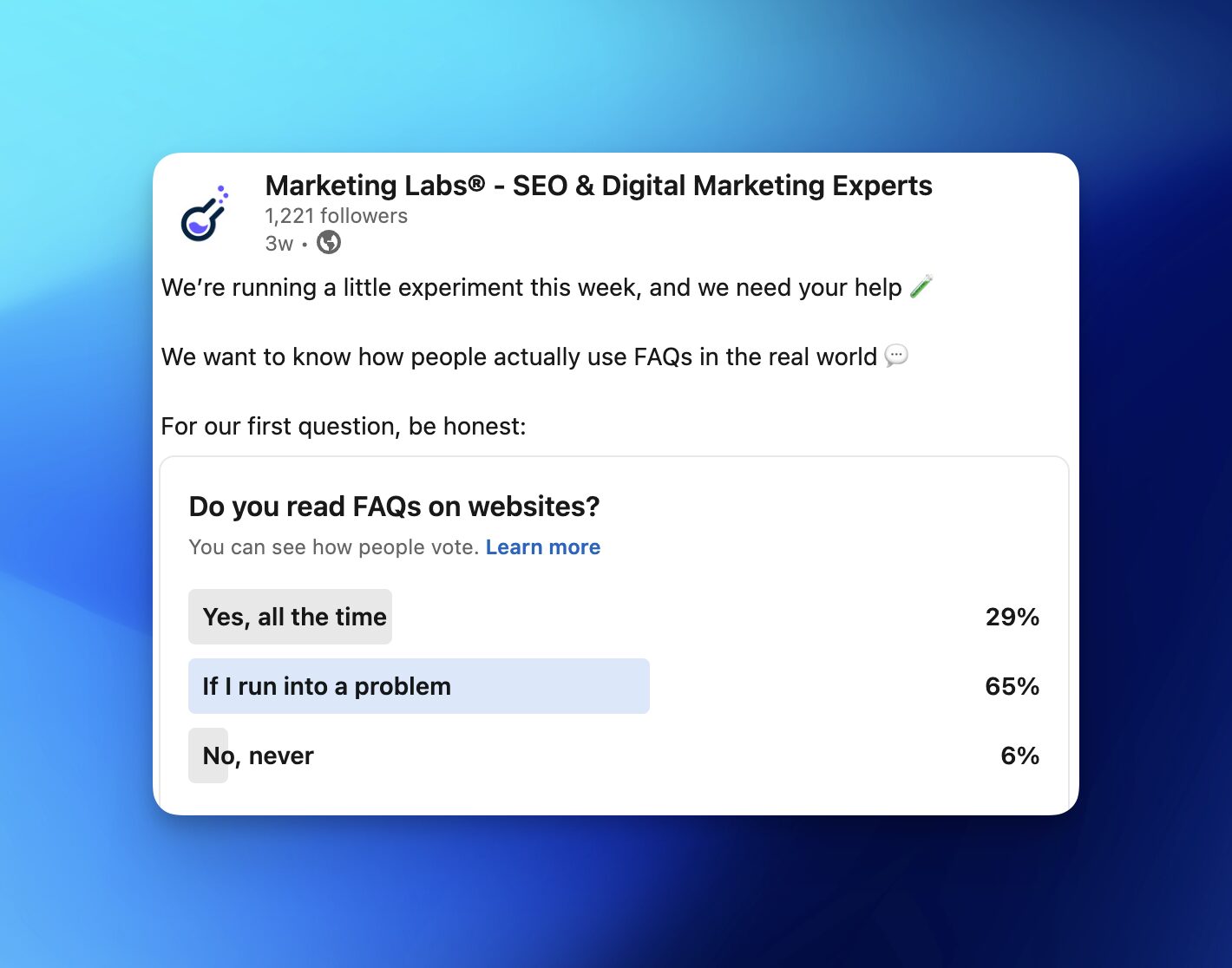
- Do you actually read FAQs on websites?
The majority of our audience (74% on Instagram and 65% on LinkedIn) said that they utilise FAQs on a website when they run into a problem.
From this, we can infer that people tend to reach for these when they’re stuck, which means you’re showing up exactly when they need you most.
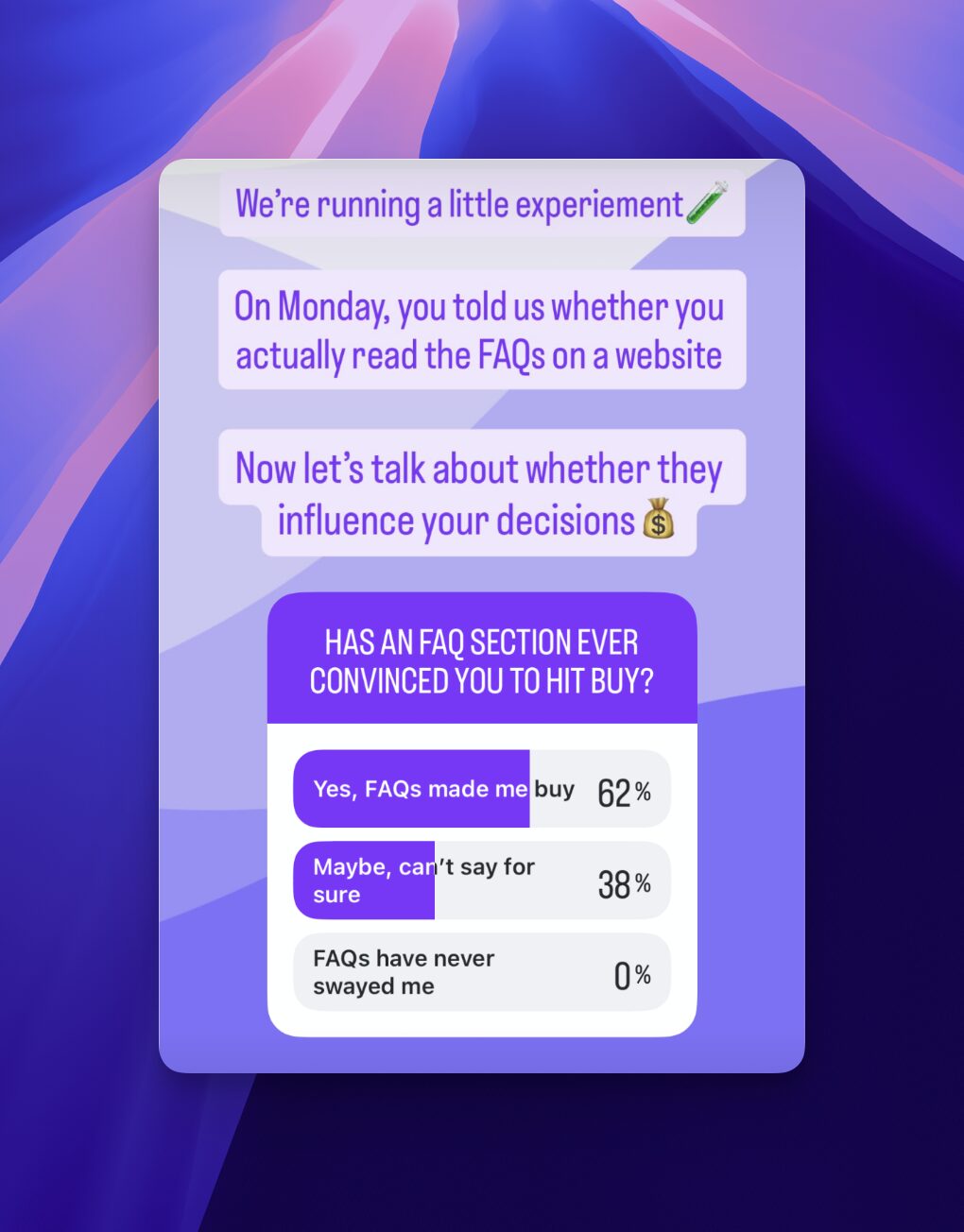
- Has an FAQ section ever convinced you to hit buy?
When asked if viewing FAQs on a website has ever convinced them to purchase, the majority of our audience on LinkedIn (55%) answered that they can’t say for sure, as this is, of course, difficult to attribute.
On Instagram, however, 62% report recalling that the FAQs persuaded them in their decision-making.
The key takeaway? Even if attribution isn’t clear, FAQs are clearly still a part of the decision-making process, whether users consciously recognise it or not.
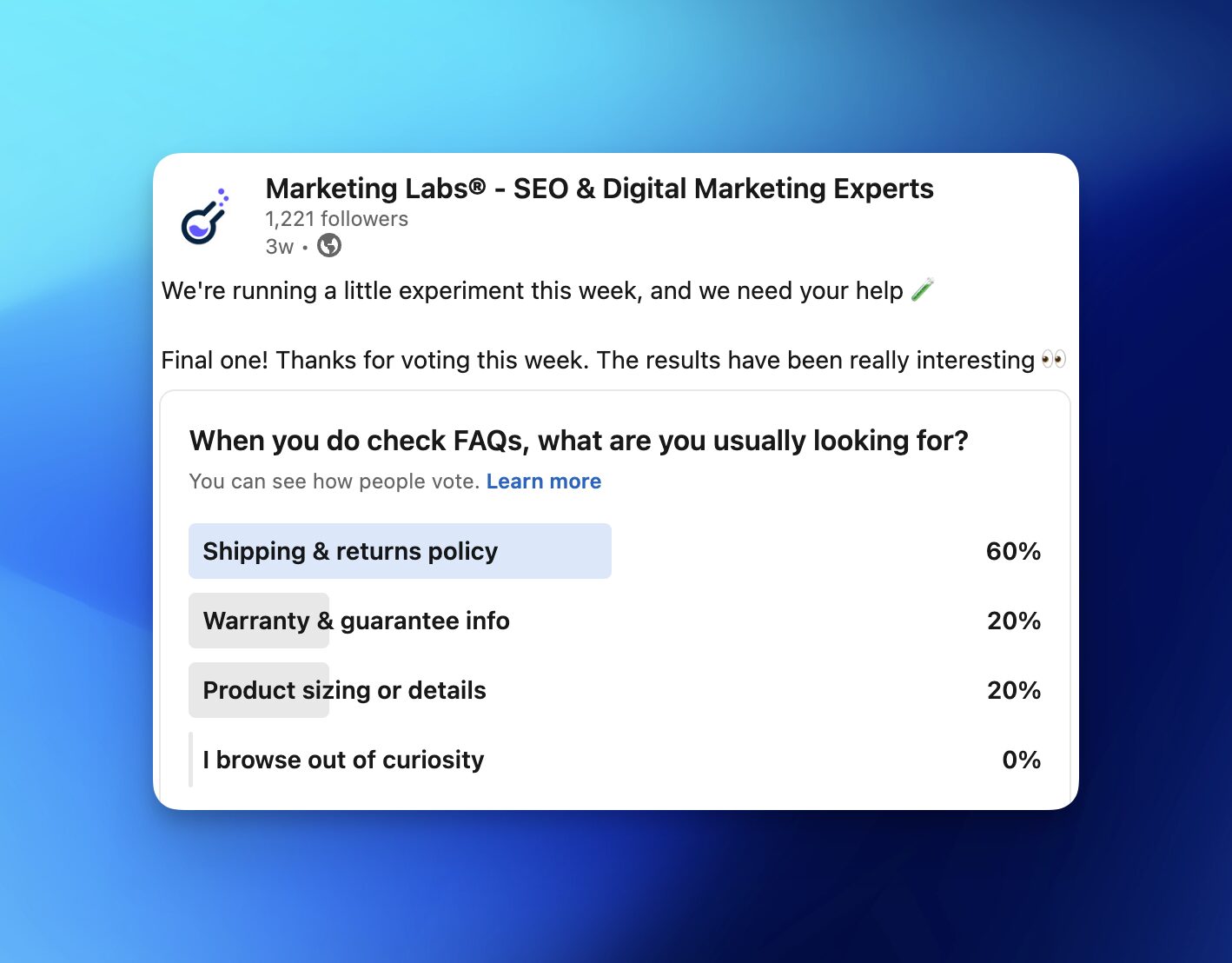
- When you do check FAQs, what are you looking for?
On both Instagram and LinkedIn, the majority of our audience said they use FAQs to seek information about shipping and returns policies, with the rest of our audience stating that they look at warranties and guarantees, as well as product information.
If your FAQ section doesn’t include this information, you’re not answering your customers’ queries and may be losing conversions because of it.
The data makes it clear: FAQs still influence purchasing decisions. The question is: how do you structure them so they’re actually helpful?
What is the best way to create FAQs?
Based on the above data from our audience, FAQs are clearly beneficial in supporting customers when making a purchasing decision. But is there a right way to structure them?
Before writing any FAQs, it is important to ensure you are using questions that exist within your community.
Use surveys, social listening forums, customer feedback, reviews, and customer service query data to identify the pain points they face when purchasing from your brand.
Once you have the content of your FAQs based on real customer feedback, it can be helpful to structure them to match users’ intent and use the language they actually use.
A short, direct, and concise answer paragraph for each question is perfect. Using search terms that your customers would ask is important not only for supporting your community but also for SEO.
Product-specific questions belong on those product pages and on a dedicated FAQ page that’s easy for users to navigate to from anywhere on the site.
Finally, add FAQPage schema markup to help search engines and AI platforms categorise your content accurately and include it in their search results.
Key takeaways
It’s important to remember that the primary purpose of FAQs on your website is to help users and guide them through the process of trusting your brand and making a purchase, second to optimising for search engines.
By genuinely helping your customers, you will likely boost your SEO performance, as search engines view your content as useful and trustworthy, thereby pushing it higher in search results.
FAQs are just one piece of the puzzle. If you want the full picture, our expert SEO team can help you figure out what’s working, what’s not, and what to do next.