
If you’re building a WordPress website for your business, one of the first things you’ll quickly discover is its flexibility. As an open-source CMS, WordPress gives you access to thousands of plugins created by developers all over the world. This is one of its greatest strengths – but it can also be its downfall, too.
With so many plugins available, it’s not always clear which ones are reliable, which ones are actively maintained, and which ones might cause more problems. Many plugins look promising, but they’re not updated regularly or aren’t built to meet the standards a modern website requires. On the surface, it might look good, but will it really help and are you keeping your plugins updated?
After building hundreds of websites, we’ve tested many plugins firsthand and seen which ones stand the test of time. To save you hours of research (and a fair bit of trial and error), we’ve put together our own list of 10 recommended WordPress plugins that we trust, use daily, and confidently install on client sites. These plugins cover everything from SEO and site speed to security, eCommerce, site performance and content structure.
Whether you’re setting up a new site or improving an existing one, this list will help you avoid the pitfalls of poorly maintained plugins and focus on tools that genuinely make your website easier to manage and more enjoyable to use.
1. Rank Math

I don’t think it will come as any shock to think we’d recommend an SEO plugin to kick things off – after all, we are a specialist SEO agency. Rank Math is a powerful SEO plugin that helps you manage the internal architecture of your WordPress site’s internal architecture. With over 3 million active installations and 7,328 5-star reviews, it’s no wonder this makes a good recommendation.
It allows you to optimise pages, add schema markup, set up sitemaps correctly, and improve overall organic visibility. It’s also beginner-friendly and ideal for anyone looking to improve their site’s SEO without learning technical SEO.
Key benefits & features of Rank Math SEO
- Provides step-by-step SEO guidance for beginners, showing exactly how to improve page titles, metadata and readability.
- Adds essential SEO features automatically – including schema, XML sitemaps and indexing rules.
- Improves your visibility on Google by helping you structure content for search.
- Scales easily as your website grows, supporting everything from blogs to eCommerce with advanced SEO settings.
2. WooCommerce

Next up, it’s WooCommerce – the all-in-one plugin that magically turns WordPress into a fully functional online shop, helping you manage products, customers, shipping methods, payments and more. It’s highly flexible, allowing you to turn your WordPress website into a bespoke, dedicated online shop. Oh, and it’s also completely FREE!
It’s the most-trusted online eCommerce platform, with over 4m+ online stores built using WooCommerce. It also comes with lots of extensions, including subscription payments, product bundles, XERO integrations and more.
Key benefits & features of WooCommerce
- Provides full eCommerce functionality at no cost, allowing you to sell products or services directly without using a platform like Shopify.
- It supports a wide range of product types, including physical goods, digital downloads, bookings, and subscriptions.
- Gives access to thousands of extensions that add even more flexibility as your business grows.
- Integrates seamlessly with WordPress, giving you complete control over your data, design and customer experience.
3. Advanced Custom Fields (ACF) Pro

Advanced Custom Fields (ACF®) turns WordPress sites into a fully customisable content management system (CMS) by giving you all the tools to do more with your data. As a standard installation, ACF allows you to add custom fields to posts, pages, and custom content types, making WordPress far more flexible.
The Pro version of ACF includes additional fields and features that add functionality to websites, including repeating fields, flexible content, media galleries, custom option pages, and PHP blocks.
An example of how ACF works
Let’s say a recruitment agency website needs every job listing to display the same structured information: salary, job location, contract type, closing date, responsibilities, etc.
Without ACF, the client would have to write this manually in a text editor for a standard blog post. Using ACF, we can create custom fields with a custom template design, so the client simply fills in the field in the backend without affecting how things look on the front end.
Key benefits & features of using ACF
- Makes content editing simple by replacing messy text editors with clean, structured fields that keep information consistent and easy to update.
- Allows the building of custom page layouts using repeaters and flexible content fields – no need to use the page builder.
- Ensures consistency across the website by enforcing a consistent format for posts, service pages, team profiles, and other content types (such as jobs).
- Reduces reliance on slow or heavy page builders by enabling developers to create lightweight, custom layouts.
- Creates a scalable and professional CMS that can grow with the website as more content sections and features are needed.
Free vs paid – costs and features
Free version: Basic field types
ACF Pro: Provides advanced features such as repeaters, flexible content fields, galleries, and more. Pricing for ACF Pro for a single website starts at $49/year.
4. Defender Security (WPMU Dev)

As a strong advocate for website security and management, this would be first on Josh Stapleton’s list, I am sure. Defender helps improve your site’s security with two-factor authentication (2FA), global firewall rules, malware scanning, login masking, brute-force protection and security recommendations.
Defender is brought to you by WPMU Dev, the same developers who created Smush (our no. 6 recommendation), and is now active on more than 1 million websites.
Key benefits & features of Defender
- Provides real-time protection against malware, hacking attempts and suspicious activity, keeping your site secure around the clock.
- Strengthens login security with features such as two-factor authentication, IP lockouts, and masked login.
- Offers clear, beginner-friendly recommendations that show you how to improve your site’s security without technical knowledge.
- Reduces the risk of downtime, data breaches or loss of customer trust by proactively securing your website.
5. WP Rocket
WP Rocket is a premium caching and performance optimisation plugin that improves website speed with minimal setup. It handles caching, file optimisation, lazy loading and other technical improvements, making it one of the easiest ways to boost your Core Web Vitals and load times.
We recommend WP Rocket because it consistently delivers results without requiring any technical know-how. For beginners managing their own website, speeding up a site can feel overwhelming – WP Rocket makes it effortless, and the improvements can be seen instantly.
It does come with a price tag, however, starting at $59/year for a single website.
Key benefits & features of WP Rocket
- Delivers instant speed improvements through automatic caching and performance optimisation as soon as it’s activated.
- Handles multiple speed-optimisation tasks, such as minifying files, lazy loading, and database cleanup.
- Improves Core Web Vitals metrics, helping your website meet Google’s standards for fast and efficient browsing.
- Reduces bounce rates by ensuring your site loads quickly, especially on mobile devices.
- Offers a beginner-friendly setup with powerful performance features that require no technical expertise.
6. Smush

Smush is a free (also available as a paid pro version) image optimisation plugin that automatically compresses and resizes images to improve your website’s load times. Large, unoptimised photos are a major cause of slow WordPress sites, especially for beginners who may upload photos directly from their phone or DSLR camera.
Smush ensures every image is delivered in a web-friendly format without sacrificing quality. We recommend it because it provides an immediate, noticeable improvement in website performance and SEO. It’s a simple way for business owners to keep their site running smoothly without manually editing or resizing images before uploading them.
Key benefits of Smush
- Speeds up your website by compressing large images automatically, ensuring faster loading times without noticeable quality loss.
- Boosts your SEO by improving performance scores and Core Web Vitals.
- Reduces hosting storage usage by shrinking file sizes, helping your site run more efficiently.
- Operates completely hands-off once installed, optimising every new image uploaded to your media library.
- Enhances UX by delivering faster pages that keep visitors engaged.
7. All-in-One WP Migration and Backup

All-in-One WP Migration and Backup, developed by Servmask, is a user-friendly, efficient plugin that does exactly what it says on the tin. It helps users back up and migrate WordPress sites with ease.
Having a recent backup is essential for any WordPress website, and with over 5 million active installations, it’s no wonder we recommend this plugin, which uses a simple one-click backup process.
Key benefits of All-in-One Migration and Backup
- Export your entire site with a single click – database, media, themes, and plugins.
- Works across all hosting providers, from budget shared hosting to high-end servers.
- No technical skills needed, simply install and export.
- Seamlessly move between MySQL, MariaDB, and SQLite databases.
- Secure and reliable, and according to Servmask, it’s even trusted by NASA.
8. WP Code
WPCode allows you to safely insert custom code snippets, tracking scripts and custom functions without editing your theme files directly. This is particularly helpful for adding things like Google Analytics or search console tags and Meta Pixels.
We recommend WPCode because it prevents users from accidentally breaking their website by modifying core theme files. It offers a safe, structured environment for managing code, making it an essential tool for small business websites that rely on tracking for digital marketing or minor customisations.
Key benefits of WPCode
- Makes installing tracking scripts – such as Google Ads tags or Meta Pixels quick and straightforward.
- Organises all custom snippets in one clean interface, making them easy to manage and update.
- Offers advanced conditional logic (Pro) so code can load only on specific pages or scenarios, improving performance and control.
- Streamlines workflows for both beginners and developers, making customisation and tracking much easier.
9. Site Kit by Google

Site Kit is Google’s official WordPress plugin, providing easy access to Analytics, Search Console, PageSpeed Insights and other Google tools – all inside your WordPress dashboard.
It simplifies the setup process and gives clear insights into how people find and use your website. A simple, no-nonsense plugin that removes the technical barriers that often prevent beginners from understanding and getting access to their performance data.
Everything is presented clearly and in one place, helping small business owners make informed decisions about their content and marketing efforts.
Key benefits of Site Kit
- It brings all your essential Google data – Analytics, Search Console and PageSpeed – together into the WP dashboard.
- Removes technical barriers by automatically handling account verification and tracking setup.
- Helps you identify which pages and keywords drive the most traffic, guiding smarter content and marketing decisions.
- Makes performance insights accessible to beginners by presenting information and data in simple terms.
- Completely free and lightweight, offering valuable analytics without slowing down your site.
10. Easy Table of Contents

Easy Table of Contents automatically generates an interactive table of contents for long-form content and blog posts, helping visitors navigate your content easily. It improves the user experience, keeps readers engaged and can even support SEO by giving search engines a clearer understanding of your post structure.
Key benefits and features of Easy Table of Contents
- Enhances UX by helping visitors jump directly to the sections they care about.
- Increases engagement and reduces bounce rates.
- Supports SEO by giving search engines clearer structural signals.
- Lets you place the table automatically or manually wherever it makes the most sense.
- Offers custom styling options so the table blends seamlessly with your brand.
My summary
Choosing the right plugins for your WordPress site is an important decision. With thousands of options available, it’s easy to feel overwhelmed and end up using plugins that slow your site or create security risks.
The 10 we’ve included in this guide are ones we trust, install regularly, and recommend with confidence because they make a genuine difference in how websites run and perform.
As you grow your business and your site, the key is to keep your plugin stack lean, purposeful and well-maintained. Start with the essentials and avoid installing anything that a reputable developer doesn’t actively support.
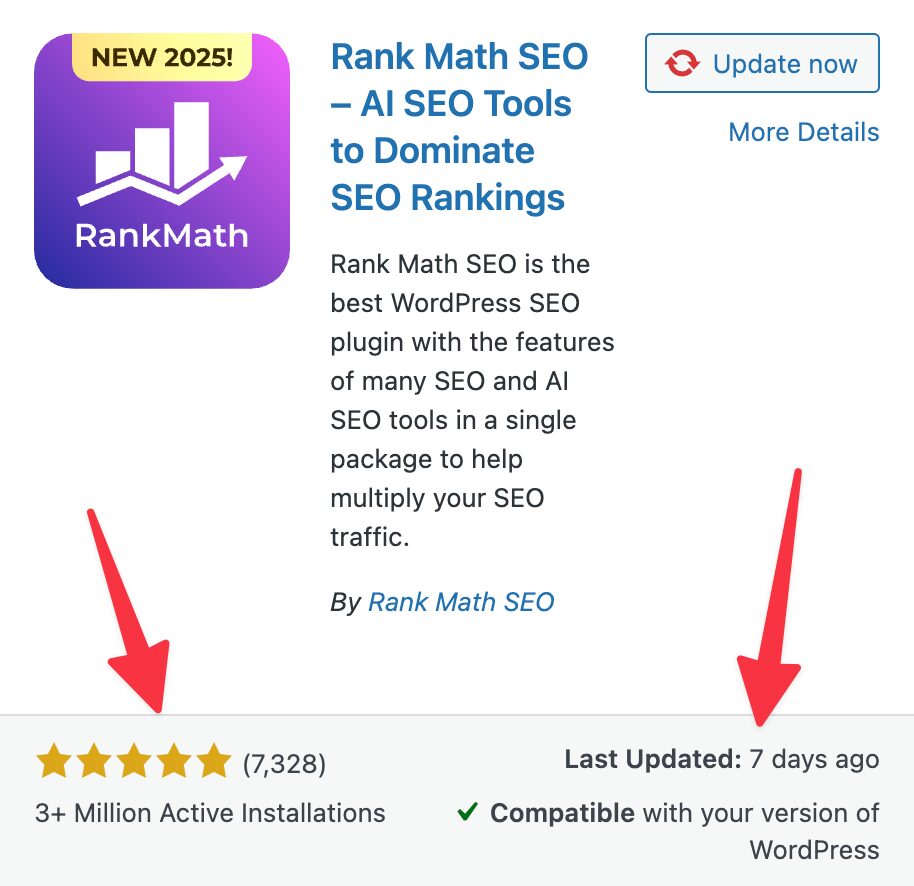
Our top tip: Always check the active installations, reviews, and the ‘last updated’ date. It’s usually a good sign of whether a plugin is good. If it has many installations but poor reviews, listen to them.
Of course, if you ever need guidance choosing the right tools, improving performance or planning your website setup, we’re always here to help.